How to compare AI makeup previews
Compare two AI makeup previews against the same original photo, at the same size and on the same screen. First check for changes to your face or lighting; then compare makeup placement and intensity. Keep a specific idea to try, rather than treating the most polished image as the winner.
Choose one question before comparing
Start with a decision you can act on: softer or stronger eye definition, a muted or bold lip, or less or more blush. Choose two looks that answer it.
If you are still choosing a direction, use the occasion guide first. This checklist evaluates existing previews; it is not a validated accuracy test.
Keep the photo and viewing conditions fixed
- Keep your original photo locally. Use that same unfiltered file for each preview, with the same crop. Do not use the first generated result as the input for the second.
- For a new photo, keep the camera position and lighting consistent. A brighter selfie can make one look seem preferable before makeup changes anything. The selfie preparation guide covers framing and light.
- View the original and both results on one screen at the same zoom. Keep screen brightness and any warm display mode unchanged while comparing.
- Label the results A and B, and note the chosen looks. If a tool offers intensity or retouch controls, keep unrelated settings fixed and record what you changed.
If the results use different photos, compare broad style ideas only. You cannot confidently attribute their differences to makeup alone.
Check the face before judging the makeup
Set a result aside for personal comparison if it changes features that the makeup decision depends on. Check the original beside each preview before comparing A with B.
| What you notice | Why it matters | What to do |
|---|---|---|
| Eyes, nose or jaw appear a different shape | A changed face can drive your preference. | Do not use that result to decide what suits your features. |
| The whole image becomes brighter or warmer | Lighting and makeup color are mixed together. | Set aside the color comparison; keep only a broad placement idea. |
| A liner stroke crosses the eyeball, or lipstick appears on teeth | The drawn placement is not a useful application guide. | Discard the affected detail instead of copying it. |
| Skin texture disappears | Smoothing can be mistaken for a foundation result. | Do not infer coverage or finish from that area. |
If neither result passes, stop rather than choosing the less obvious distortion.
Compare three makeup details
Judge each surviving preview feature by feature. Write observations you could explain without showing the picture:
- Eyes: where does the darkest color sit, and how much of the lid does it cover? Note whether you prefer a thin line or a broader shaded area.
- Cheeks: where is blush placed, and how strong does it look relative to the eyes and lips? Separate placement from a general increase in brightness.
- Lips: compare how light or dark the lip looks beside the rest of the face. Record a color direction, not an exact lipstick shade.
A full-look preset changes several things together. You can prefer its eyes and dislike its lips without rejecting the whole idea; record those as choices for a real makeup trial, not as controls the app necessarily offers.
Turn the comparison into one next step
Use a keep/change/test note. Illustrative example: “Keep A’s softer eye definition. Change the lip to something less dark. Test a thin brown liner with the lip color I already own.”
Try that one change before buying a full set of products. A generated image cannot establish how a formula feels or wears. Perfect Corp’s lipstick try-on guidance also treats rendered shades as guidance, with results depending on shade digitization, rendering, camera and lighting. Check an actual product separately when a precise match matters.
Use sample faces for the right decision
Lookslate offers six complete looks on AI-generated fictional sample models, with previews made in advance. Keep the sample person the same when comparing styles. Samples let you explore the difference between looks without uploading your face; they do not demonstrate how a shade or placement will appear on you.
If an own-photo option is available, compare its result with the original you kept locally. Do not assume it preserves every feature. Neither a sample nor an own-photo preview proves an exact product match.
Start with the AI makeup try-on sample looks. Take one specific observation into your next practice session, and leave an uncertain preview undecided.
Frequently asked questions
Should I use the same photo for every AI makeup preview?
Yes. Reuse the same original file and crop so changes in pose, exposure or existing makeup do not become part of the comparison. Keep an unchanged copy to check each result.
What if an AI makeup preview changes my face?
Set it aside for judging what suits your features. Check the original, discard distorted details and avoid choosing a look just because the image changed your facial shape or smoothed your skin.
Can a sample model tell me which lipstick to buy?
No. A sample can show a style or color direction on that fictional face. It does not establish an exact shade match on you, product comfort or wear.
Looks to try
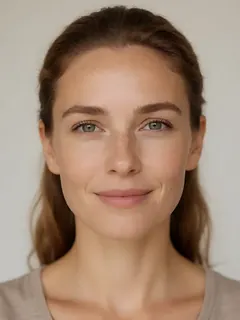
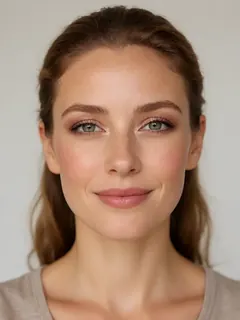
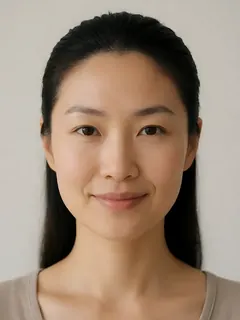
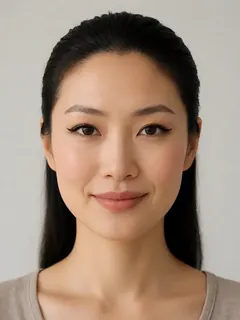
All faces shown are AI-generated fictional models, not real people.